The Children's Place
4.916.21KReviews
Analysis ByAppCompare
I spent time using The Children's Place as a mobile shopping app, focusing not only on finding children’s clothing but also on how comfortable the overall shopping process feels. It is a free shopping app from The Children's Place, Inc, aimed at families who want to browse the brand’s clothing for children and other family members from a phone. My general impression is positive: the app makes sense for repeat shoppers and parents who prefer checking sizes, styles, and seasonal items without opening a browser.
What makes the app worth considering is its narrow focus. This is not a marketplace where unrelated sellers compete for attention. It is a direct route into The Children's Place catalog, so the experience feels more organized than a general shopping platform when I already know the brand I want. At the same time, that focus is also its biggest limitation: if I want to compare several brands, search across different retailers, or find the lowest possible price in one place, a broader shopping app is usually more useful.
How the app feels when shopping for children’s clothing
The first thing I noticed is that the app is built around browsing rather than complicated setup. I can open it when I have a rough idea—such as looking for school clothes, sleepwear, or an outfit for a child—and move through the brand’s selection from there. That is more practical than trying to remember an exact product name, especially when shopping for a child whose size or style preferences change often.
The app belongs to the Shopping category and carries an Everyone age rating. That combination fits its purpose: it is a retail tool rather than an entertainment app, and its subject matter is family clothing. The developer shown for it is The Children's Place, Inc, which is useful context for anyone who prefers dealing directly with a retailer instead of an independent marketplace.
In everyday use, I found the app most helpful when I had a short shopping window. A realistic example is a parent waiting outside school or sitting during a child’s activity and realizing that a few basics are needed for the next week. Opening the app lets me browse the relevant clothing range, narrow my attention to the child and type of item I need, and continue shopping without setting up a full computer session.
That convenience matters more than it may sound. Children’s shopping often involves several small decisions: the right size, whether an item works for the season, whether a top matches existing clothes, and whether buying a multipack is sensible. A focused retailer app reduces the number of unrelated results I have to ignore. However, I still need to pay attention while browsing because a visually appealing item is not automatically the right choice for a child’s wardrobe or routine.
Trust starts with knowing who is behind the storefront
I am generally more comfortable with this kind of app when the retailer’s identity is clear. Here, the connection with The Children's Place is direct rather than hidden behind a collection of third-party sellers. That does not mean I should stop checking the details before making a purchase, but it does make the shopping context easier to understand.
The app has been available since December 14, 2017, and it has reached over a million installs. Its average rating is 4.9 from around 87 thousand ratings, with about 16 thousand written reviews. Those figures suggest that many shoppers find the app useful, although I would not treat a strong store rating as proof that every order, device, or shopping situation will be perfect.
I prefer to read user feedback for practical clues rather than simply looking at the average. The most useful questions are whether people found browsing straightforward, whether account access behaved as expected, and whether the ordering process was easy to understand. A high rating can tell me that the app has broad appeal, but it cannot replace checking the information shown during my own session.
One sensible habit is to separate trust in the app from trust in an individual purchase. I can be comfortable using the retailer’s official shopping channel and still review the item details, size choice, delivery information, and final order summary carefully. That small distinction prevents the common mistake of assuming that a familiar brand removes the need to verify the details of a specific transaction.
What I look for before signing in or checking out
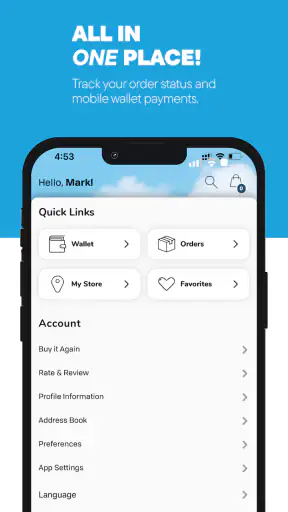
Shopping apps often become more personal once an account is involved. Saved details, order history, and personalized shopping can be convenient, but they also make it important to understand what I am choosing to provide. I treat account creation as optional until the app clearly gives me a reason to use it, rather than signing in automatically just because the option appears early.
For a family shopper, this is especially relevant because the person using the phone may be buying for several children. I would avoid entering more personal information than the purchase requires, and I would check each field before saving it. Names, sizes, addresses, and contact details can make future shopping faster, but they should be kept accurate and limited to a genuine need.
I also pay attention to visible choices around notifications and communication. If the app presents a choice about promotional messages, I decide based on how often I actually want to hear from the retailer. Someone who shops only occasionally may find frequent alerts distracting, while a parent building a seasonal wardrobe may appreciate timely reminders. The important point is that the choice should be deliberate rather than automatic.
When I reach an order summary, I slow down instead of treating the last screen as a formality. I check the selected sizes, quantities, colors, delivery details, and total shown before confirming. This is one of the most useful habits with children’s clothing because a small size mistake can turn a quick purchase into a return or exchange task.
Data-sensitive moments during normal use
The most sensitive parts of a shopping app are not always dramatic. They are the ordinary moments when I search, save an item, enter an address, or continue from one device to another. I consider each of these a point where user control matters more than visual polish.
For example, browsing children’s clothes may reveal patterns about what a family is preparing for: school, a new season, a birthday, or a growing child. I do not assume anything about how the app handles that information beyond what is visibly explained to me. Instead, I look for clear notices, understandable choices, and settings that let me review or change my preferences.
I also avoid treating a child’s size as a harmless detail simply because it appears in a shopping context. It may be practical to remember sizes while comparing products, but I prefer to enter only what helps complete the task. If I am browsing casually, I do not create a detailed profile for every child unless the convenience is genuinely worth it.
Another careful moment is using the app on a shared phone. If several family members use the same device, I check whether the current account is mine before viewing saved information or proceeding with an order. I also avoid leaving a checkout screen open where someone else could accidentally change the cart or see personal details.
These are not reasons to avoid the app. They are reminders that a convenient retail tool still deserves normal digital hygiene. I find the experience more trustworthy when I make those decisions consciously instead of assuming that convenience and privacy always move together.
Practical controls that improve the shopping routine
The app’s strongest practical quality is that it puts a dedicated retailer within easy reach. I can use it for a quick browse, a more deliberate seasonal refresh, or a repeat visit when I already know the type of clothing I need. The best workflow depends on the situation.
For a fast purchase, I would begin with the child’s actual need rather than browsing every category. I might look for a small group of suitable items, compare the available choices, and then review the cart from the perspective of the week ahead. This keeps impulse purchases from taking over and makes it easier to spot duplicate basics.
For a larger wardrobe update, I would first make a short list outside the app: everyday tops, bottoms, sleepwear, or occasion clothing. Then I would use the app to fill those gaps. This approach is more effective than adding attractive items randomly because children’s clothing can look inexpensive or useful individually while becoming excessive as a group.
A less obvious benefit of a focused brand app is continuity of browsing. If I am interrupted by a child, a phone call, or another task, returning to the same retailer is simpler than reconstructing a search across multiple websites. The trade-off is that I may miss a better alternative from another brand, so I use the app for brand-specific shopping rather than assuming it represents the whole market.
I also recommend checking the final selections from a practical viewpoint. A product can look suitable in isolation but fail to fit the child’s existing wardrobe, school requirements, or laundry routine. Before confirming, I ask whether the item fills a real gap, whether the size choice is based on current needs, and whether I would still want it without the excitement of a new collection.
Where it beats general shopping apps—and where it does not
Compared with a broad marketplace, this app is easier to understand when I already want clothing from The Children's Place. The catalog is not mixed with unrelated brands, seller profiles, or an enormous range of household products. That narrower experience can reduce decision fatigue and make a short clothing search feel more manageable.
A general shopping app is usually better when I need to compare brand quality, delivery options, prices, or styles across many retailers. It can also be more useful when I am searching for a very specific item and do not care who makes it. In that situation, the dedicated app adds an extra step because I may eventually need to leave it and continue comparing elsewhere.
Compared with using a mobile browser, the app’s advantage is convenience for repeat access. I do not have to begin from a search engine every time I want to browse the retailer. The disadvantage is that installing a dedicated app adds another piece of software to my phone, and some shoppers may prefer keeping all retail activity in the browser.
That choice comes down to shopping frequency. If I buy from this retailer regularly, the app feels justified. If I am making a single purchase or only comparing possibilities, the browser or a multi-retailer service may be the cleaner option. I would not install it simply because every retailer has an app; I would install it because the direct access matches my habits.
Version, device fit, and everyday friction
The current version is 2609.1.0, and the listed minimum operating system is Android 7.0. That makes the app accessible to people using older Android devices, although real-world performance can still depend on the phone, its available storage, connection quality, and the way the current app behaves on that particular device.
I would make sure the phone has enough free space and that the operating system is reasonably maintained before blaming the app for slow loading or interruptions. Shopping is frustrating when product images or checkout screens take too long, but network conditions can affect any retail service. If I am placing an important order, I prefer a stable connection and enough time to review everything calmly.
The main friction is not that the app is difficult to understand. It is that clothing purchases involve details the app cannot decide for me. I still have to judge fit, quantity, suitability, and whether the item is needed. A smooth interface can shorten the search, but it cannot eliminate the uncertainty that comes with buying clothes for a growing child.
I would also avoid making a purchase while distracted. A child’s size can be easy to misread, especially when shopping for more than one child in the same session. A short pause before confirmation is more valuable than rushing through the final screen and dealing with a correction later.
Who should use it and who should skip it
I think this app is a good fit for parents, relatives, and caregivers who already shop with The Children's Place or want a focused way to explore children’s clothing from that retailer. It is also useful for people who prefer handling routine shopping from a phone and want a direct brand experience instead of a crowded marketplace.
It may not be the right choice for someone who wants a universal children’s clothing search, detailed cross-brand comparison, or the widest possible selection in one place. Bargain hunters who compare every retailer before buying may get more value from a multi-store shopping tool. Likewise, occasional shoppers may prefer a browser so they do not add another app for a one-time task.
I would be cautious about using it as an automatic shopping list for a child. The app can help me find products, but I still need an independent plan for what the family actually needs. That distinction is important: the app is a shopping channel, not a substitute for checking the wardrobe, measuring carefully, or setting a budget.
My cautious verdict after using it
My final view is that The Children's Place is a useful, focused shopping app with a clear reason to exist. It brings the retailer’s children’s clothing experience to Android in a way that suits repeat shoppers, quick browsing, and families that prefer dealing directly with one brand. Its strong average rating and broad install base make it easy to see why it has become a familiar option for many shoppers, but I still judge it by my own needs rather than by popularity alone.
The app earns my recommendation when convenience, brand familiarity, and mobile access matter more than comparing every possible retailer. I would use it for planned clothing purchases, especially when I know the type of items I need and want to avoid a distracting marketplace. I would not rely on it as my only shopping tool when price comparison, cross-brand choice, or a one-off purchase is the priority.
My best advice is to use it with clear boundaries: allow only the account access and communications that make sense to you, review visible choices before continuing, keep children’s information limited to what is useful, and check every order detail before confirming. The strongest reason to install it is controlled convenience, not blind trust. Used that way, it is a practical addition for families who regularly shop with this retailer.
FAQ
What is The Children’s Place app used for?
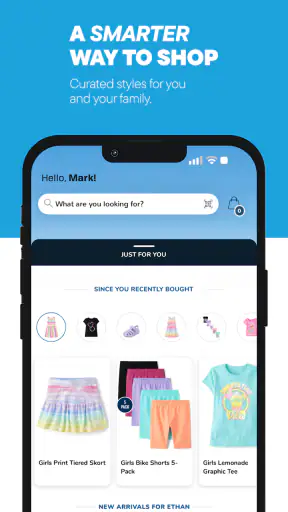
The Children’s Place app is a shopping platform for children’s clothing, shoes, accessories, and seasonal essentials. After installing it, users can browse collections by age, size, category, or occasion, view product details, check available colors and sizes, and place orders from a mobile device. It is designed for parents and caregivers who want a convenient way to shop for kids’ apparel.
Can I find discounts and special offers in The Children’s Place app?
Yes, the app commonly features sales, promotional pricing, clearance items, coupons, and limited-time offers. Depending on the promotion, discounts may require a code or may be applied automatically at checkout. Before completing an order, carefully review the terms, eligible products, expiration dates, and any minimum purchase requirements, since offers can vary and may not always be combined.
Does The Children’s Place app support in-store pickup or store shopping?
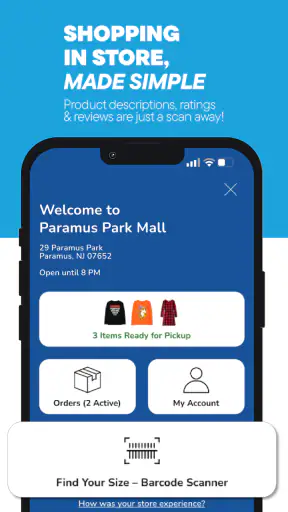
Availability of store-related services can depend on the product, location, and current company policies. In supported areas, the app may show nearby stores, product availability, or pickup options during checkout. Inventory displayed online can change quickly, so it is advisable to confirm the selected store, pickup instructions, and order status before traveling to collect an item.
How do shipping, returns, and exchanges work when ordering through the app?
Shipping methods, delivery estimates, fees, and return options are presented during the ordering process and may vary according to location, order value, and product type. Customers should inspect the current return policy before purchasing, especially for clearance merchandise or special promotions. Keep the order confirmation and packaging, as these details may be required for a return or exchange.
Is The Children’s Place app safe and easy for parents to use?
The app provides a mobile storefront with account, payment, order, and shipping features, so parents should download it only from the official Google Play Store or Apple App Store. Use a strong password, verify the checkout total, and review permissions before installation. The interface is generally straightforward, but users should still check privacy, payment, and account settings carefully.
Pros
- Frequent promotions can make children’s clothing more affordable.
- Easy browsing by age
- size
- gender
- and clothing category.
- Offers clothing
- shoes
- accessories
- and essentials in one app.
- Saved account details can speed up repeat purchases.
- Useful order tracking keeps delivery updates in one place.
Cons
- Some popular sizes and styles may sell out quickly.
- Promotional pricing can make the final cost harder to compare.
- App performance may vary on older phones or slower connections.
- Returns may require checking specific item and purchase conditions.
- Product availability and delivery options can vary by location.